
WebChat - Troubleshooting
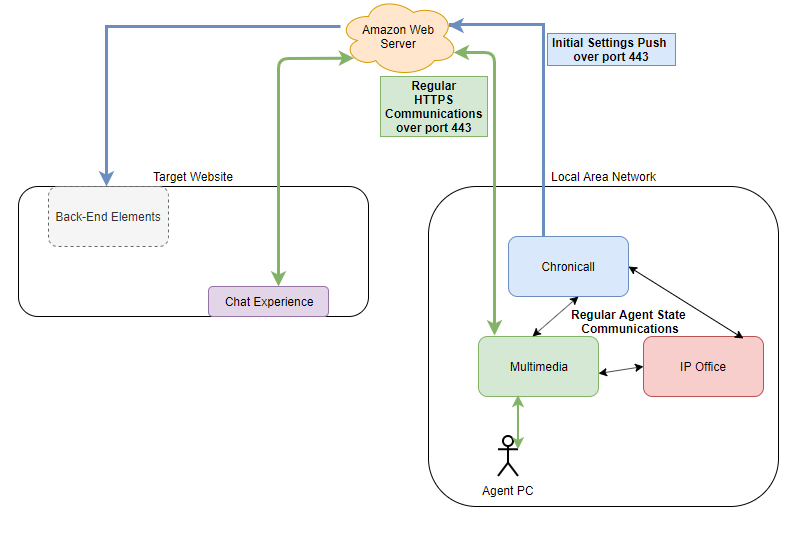
Webchat Diagram
Known Issues
-
Chat continues to queue although agents have logged out (post queue).
- Currently, if a customer is in a chat queue and all agents are logged out (end of day, or because of other issues), the chat will remain in queue until they refresh their browser, an agent reconnects, or they give up.
- We do not currently send the browser a message that the state of agents' availability has changed.
-
Chrome Diag Console Tool shows (Xima Chat) Not configured for chat as shown below, due to a bad header in the MM skill.

Diag Tools
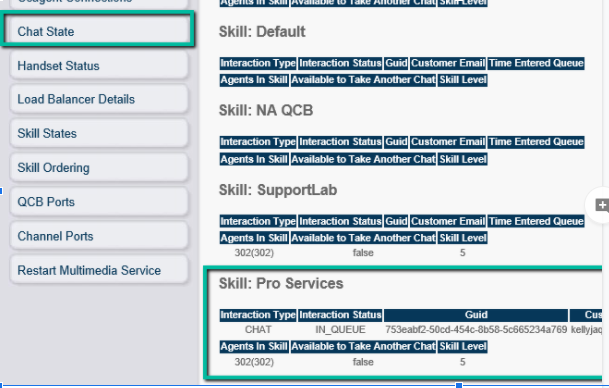
- MM Diag - Chat State
-
Displays queued chats by group.
-
Displays participating agents, availability, and skill.
-
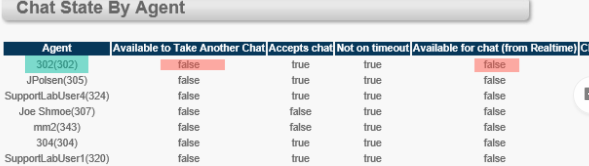
This diag page also breaks out the chat status for each agent in the "Chat State by Agent" section.
-
Logging Filters and Feature Toggles
- Feature Toggles: None at this time.
- Log filters:
- Chat Queue Status Debug — has only one message associated with it. This message shows what agents we believe are logged into a skill whenever we'd want to know that (usually when a new chat comes in, for Estimated Wait Time).
- Chat Readiness — appears on both Chronicall and Multimedia, as Chronicall is actually in control of calculating chat readiness. It will show whether an agent is ready, display why they aren't if not, and it will tell the MM server if an agent cannot handle another interaction.
- Chat Routing — Note: turn this on only while diagnosing, then turn it off when complete. This filter is quite verbose and contains things like "this is what the queue will show if somebody tries to enter it right now," everything to do with chat routing (from chats starting to chats ending), and the process of picking which agent to send a chat to. If somebody is having a chat issue that isn't related to agents, this filter should help pinpoint where it is — and even if it is related to agents, it can still be very helpful.
Possible WebChat Issues
Web Chat Window Doesn't Appear On Web Page
See Multimedia Web Chat Box Not Appearing for the standard checks (verifying the snippet is in the page's HTML, confirming agents are logged into a skill, and the "Show Widget on Page Load" setting).
"Not Configured For Chat" Error In Diag Tools
-
The symptom of this issue is similar to the one above, where the web chat window doesn't appear as it should on the customer's web page.
-
Using the same steps as above to show the console logs, you can verify this issue by looking for the error below in the console logs:

(Xima Chat) Not configured for chat -
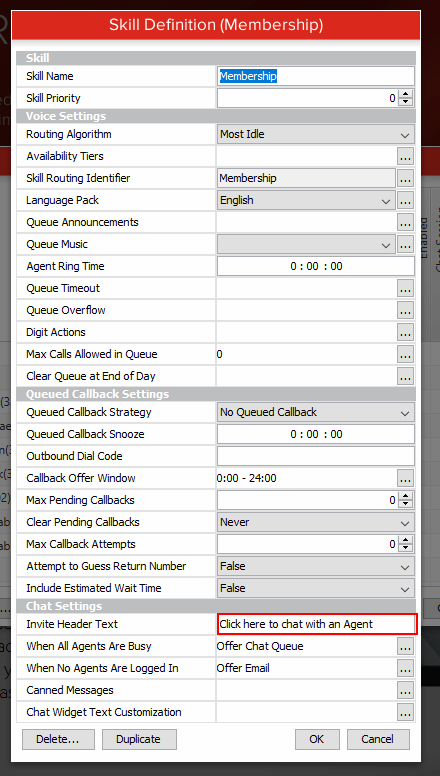
Our software currently has a bug where it does not properly format Invite Header Text from the MM Skillgroup Chat Settings.
-
To fix this, clear out the default text "Click here to chat with an Agent," then click OK and Save.
-
That should clear the error. You can then even enter the default message above back into the configuration, click OK, then Save again, and it should work.
-
Web Chat Window Appears But Not Routing
- Review the MM Chat Configuration Guide.
- Look to see if the color scheme of the chat window is black, yet it has been adjusted in the settings to be a different color.
- This is CC/ACR server LAN-side.
- What's happening is that the webchat settings are not able to push to our AWS node, which then passes them along to the webpage directly.
- Restarting CC/ACR should push those settings on pre-4.2 builds.
- However, if it continues, ensure that the server can cURL our AWS node at rest.ximasoftware.com if new config settings aren't pushing.
Web Chat Window Failing At Authentication
-
Webchat prompts that all fields need to be entered (when they're already full).
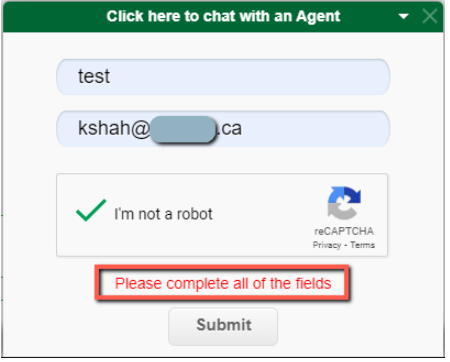
- Check and make sure the JS isn't embedded in the page as an element twice — see Webchat - Error Message for Required Fields. Basically, you'll run into a captcha conflict.
Updated 3 months ago