
Queue Callback Strategies | Reserve Agent & Wait in Queue
Overview
When using the Multimedia Service for call routing, one of the options available to you as an administrator is choosing how customers are assigned agents for call handling. One of these considerations is Queue Callback Strategies (QCB). There are two options, but first, here's how a call is reserved and then passed along:
- Caller dials into your Multimedia Queue.
- The caller is presented with an option (normally by selecting the number "1") to request a QCB.
- Caller schedules this and can be provided an ETA on when they can expect their callback.
- Call disconnects and a placeholder is set in the queue, essentially representing the caller but without having them wait in the queue.
- The placeholder finally reaches Position 1 in the queue and Multimedia dials the customer.
Reserve Agent Strategy
- During the action of Multimedia dialing the customer, the prospective agent is set outside of the queue to avoid receiving any additional calls.
- At this point, the agent is notified with a screen pop that they're currently reserved for a pending callback, with a countdown timer.
- This counter, representing 2 minutes and 30 seconds when freshly generated, represents the caller receiving their callback and being told their options:
- If they're ready to speak with an agent, press 1.
- If they're not ready to speak with an agent and need more time, press 2.
- If they no longer require a QCB, press 3.
- If the caller selects 1, the agent is presented with the call and is able to accept and assist their caller.
Wait in Queue
-
During the action of Multimedia dialing the customer, no agent is set outside of the queue, and they will continue to receive normal inbound calls.
-
The caller, while receiving their callback, is told their options:
- If they're ready to speak with an agent, press 1.
- If they're not ready to speak with an agent and need more time, press 2.
- If they no longer require a queue callback, press 3.
-
If the caller has selected option 1, they're placed back into the queue at position 1, but will be answered next.
Reserve Agent vs. Wait in Queue
The simplest explanation for choosing one over the other is based on expected queue wait times. If you expect short turnaround times, it may be ideal to use the Wait in Queue strategy. If you expect long queue wait times, it may be ideal to use the Reserve Agent strategy.
Troubleshooting: What to Look For and What to Expect
-
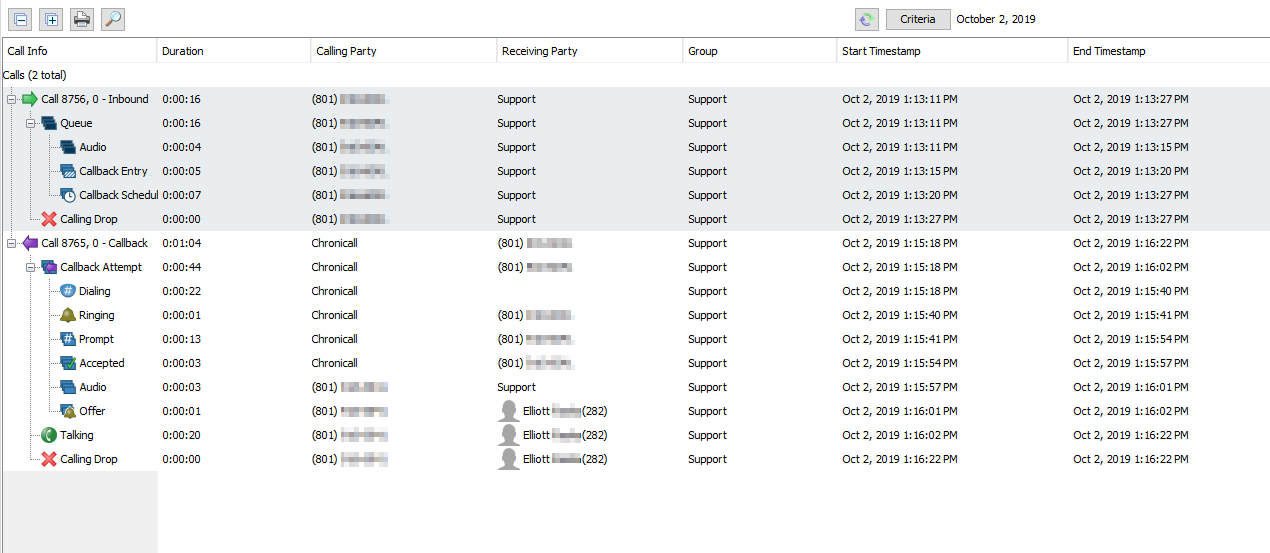
If you're receiving information regarding customer experience with the queue callback strategy, Cradle to Grave will help sort out what actually happened.
-
If a caller is stating they never got the offer to request a queue callback, your queue callback ports may have been maxed out. This will show up as a unique event type while they're waiting in the queue.
-
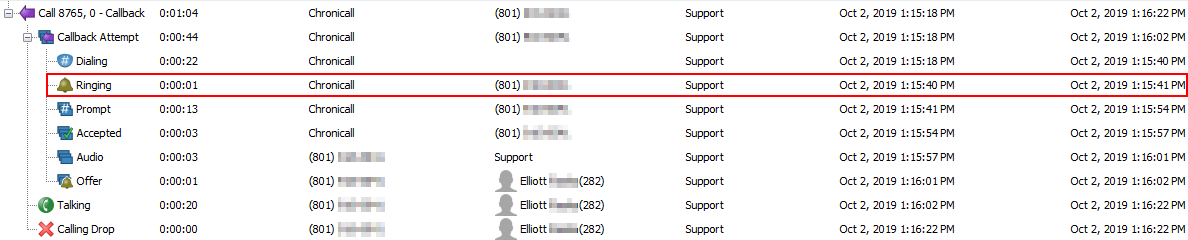
If a caller is stating that they never got a callback, locate the ringing event within the callback call and note if the call lasted 1 minute and 15 seconds.
-
If it did, that may indicate an issue with the handset.
-
If it did not, it may indicate that the caller didn't acknowledge the call, or their provider may have blocked the attempted call by Multimedia.
-
Updated 3 months ago