
Does Chronicall Support Collective Call Ringing?
Question
Does Chronicall support Collective Call ringing for IP Office?
Answer
While Chronicall will still log and capture call details within a collective call ringing environment, it does heavily skew the statistics. This is especially true if you have a multi-site IP Office setup.
AlertIf you run Chronicall in a collective ringing environment, Xima Support will not be able to resolve any related data discrepancies you might experience due to the inconsistency of the data we receive from the PBX.
How Chronicall Logging Works
Chronicall receives "packets of raw PBX data" through TCP or UDP from Avaya IP Office. Chronicall then translates those packets into events and stores them in the database for Realtime and historical Reporting.
For example, the raw data from the IP Office would show:
- "Call from 801-555-4444 is RINGING agent John Doe (123)."
Potential Discrepancies with Collective Ringing
When collective ringing is enabled in Avaya IP Office, Chronicall will likely receive repeating events from the raw PBX data — events that are true, but confusing to Chronicall.
For example, the raw data from the IP Office would show:
- "Call from 801-555-4444 is RINGING agent John Doe (123)"
- "Call from 801-555-4444 is RINGING agent Mike Smith (124)"
- "Call from 801-555-4444 is RINGING agent Steve Jones (125)"
- "Call from 801-555-4444 is RINGING agent Larry Thomas (126)"
In this scenario, if the inbound call was then answered by Steve Jones (125), the subsequent event data from the IP Office would be:
- "Call from 801-555-4444 was MISSED by agent John Doe (123)"
- "Call from 801-555-4444 was MISSED by agent Mike Smith (124)"
- "Call from 801-555-4444 was ANSWERED by agent Steve Jones (125)"
- "Call from 801-555-4444 was MISSED by agent Larry Thomas (126)"
Chronicall would then record 3 missed call events to the 1 answer event, skewing the connected Realtime and historical reports.
Collective Ringing Support
The most common issues include:
- In a collective ring scenario, IPO simultaneously rings multiple people in one group.
- If there are two or more IPOs, we see a high amount of ringing to related hunt groups with no recipient.
- Collective ringing can cause split calls in Cradle to Grave. One call could appear as several inbound calls from the same phone number, at the same time, presented to different agents.
- Since many factors — such as time delays — happen between IP Offices, one IP Office may answer the call with an agent while the other IPO is still ringing the group after the call has been answered. This wreaks havoc on the data sets we pull from the phone system, since we time-stamp all PBX events.
- This also causes repeated ringing events, or missed calls in this case, for an agent or group, affecting your reported service levels.
- We cannot guarantee accurate data at an agent level if you're looking to report on service levels.
- For example, if you have one call ringing 8 agents at a time and only one answers, that would be 7 missed calls and one answered call for those agents. So even though just 1 call came in, it resulted in 7 missed calls and one answered call in the overall statistics.
Configure Simultaneous Ringing Groups
To help offset the inconsistent event data received as a result of simultaneous ringing, Chronicall has a setting that can help reduce some of the undesirable event data.
NoteThis option was designed as a workaround and does not resolve all inconsistent events created by collective ringing.
-
Log into Chronicall.
-
Navigate to Admin (System) > System Settings > Server Edition > Simultaneous Ringing Groups.
-
Select the ellipses (...).
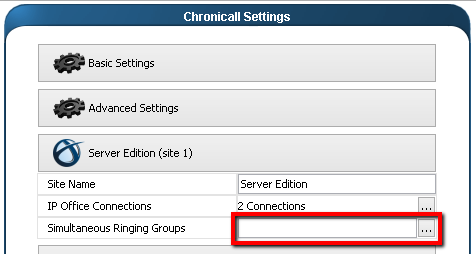
-
Select the applicable group(s).
NoteWhen a call is routed to a selected Simultaneous Ringing Group, a ringing event will be assigned to the Group rather than the Agent. This provides consistency when reporting at the group level, but will affect your agent-level reporting.
Updated 3 months ago