
Contact Center Agent Client Logs Out Automatically
Issue Description
Throughout the day, agents will be logged out of their CCAC, seemingly at random. This usually occurs when the CCAC window is minimized or in the background.
Cause
Most modern browsers have a memory-saving component that will sever the connection between CCAC and Xima if it becomes a "background" process.
Resolution
Either disable the memory-saving tool completely or add your instance of Xima to its list of sites to keep active.
Browser-Specific Steps
Chrome
-
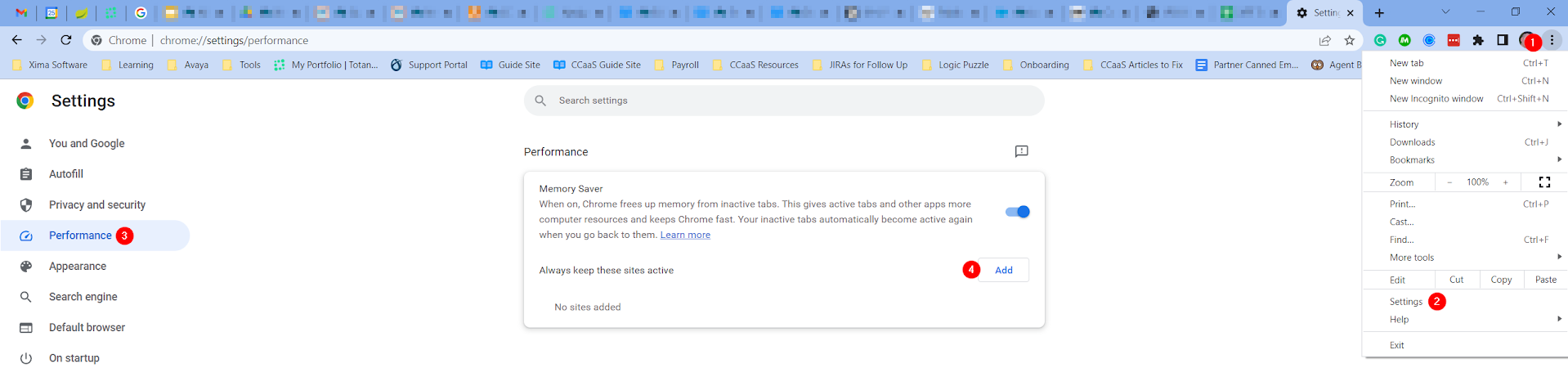
Open the ellipsis menu in the top right of Chrome.
-
Click the Settings menu option.
-
Click on the Performance side menu.
-
Either disable the "Memory Saver" function or click "Add" to include your CCAC URL in its exception list.
Firefox
- See this Firefox article to disable Tab Unloading.
Edge
- Edge has a feature called "Save resources with sleeping tabs" that can be found under the System and Performance section of settings — you will want to disable it.
Updated 3 months ago