
Sending Skill Group Calls to Voicemail
AlertXima and Avaya Call Reporting Contact Center solutions do not offer voicemail box services. A call needs to be transferred via short-code to a voicemail box, which can be automated using the steps below.
NoteChanges in IPO Manager are to be made by the Avaya partner or approved end-user engineer. Xima Support will not enter or make changes to any IPO configurations.
Configure a Short-Code in IPO Manager
Many IPO Hunt Groups are configured to allow direct access to leave a voicemail by dialing # followed by the hunt group extension number (e.g. #6490). However, the Contact Center software is unable to transfer to a short-code beginning with "#." You'll need to configure a short-code that will dial the # for you.
A common method is outlined below:
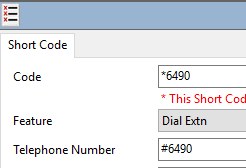
The Contact Center solution is able to transfer calls to short-codes that start with "" or don't include special characters. In the example above, the solution would transfer a call to 6490, and it would drop into the voicemail box of hunt group 6490.
As a reminder, you could also combine short-codes to reduce the work you need to do in IPO Manager using the "N" logic. For example, if many of your hunt groups reside in the 6400 range, you could build just one short-code to cover each of them:
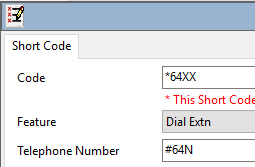
Make sure to save and merge your short-code changes.
Configuring the Contact Center Software to Send to Voicemail Boxes
Calls queuing in a skill group queue can be sent to a hunt group voicemail box in any of the following scenarios:
- Time-out: A defined period of time has passed in the queue, and the call is automatically sent to the voicemail box.
- Overflow: The call can be sent to voicemail if no agents are logged into the skill group to assist.
- Digit Action: The customer opts out of the queue by pressing a predetermined digit (0-9, *, #) and is transferred to voicemail.
- It's recommended a custom queue announcement is added to inform the caller of the voicemail-leave option and applicable digit action.
Simply enter the short-code designed in the first section of this article as the destination for any of the desired paths:
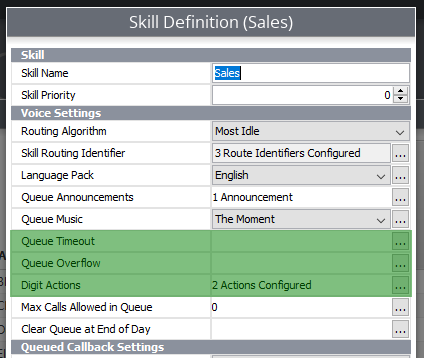
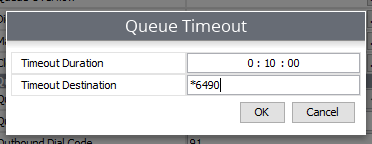
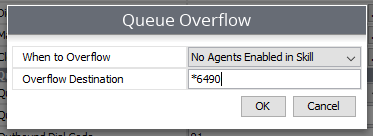
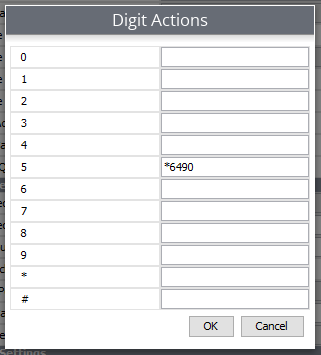
Save your changes and test each option to ensure the short-code is behaving as expected.
You may also test the short-code by dialing it from any phone on your PBX — it should drop you into the desired voicemail box if configured correctly.
Updated 3 months ago