
Click to Dial with the Salesforce Plugin
I'd like to be able to use the Click to Dial functionality while also using the Salesforce Plugin. What do I need to do to make that work?
Answer
- You must use Xima's SSL certificate.
- When using WebRTC, you cannot also be logged into a physical phone or Avaya softphone at the same time (e.g., IX Workplace/Equinox or Avaya Communicator).
- If you want to use your physical phone or softphone for audio, you must follow a specific login process. Here are the steps:
Steps
-
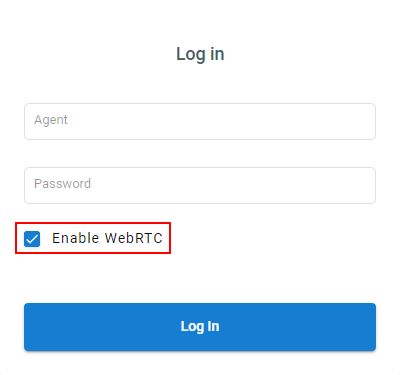
Log into CCAgent and select Enable WebRTC.
-
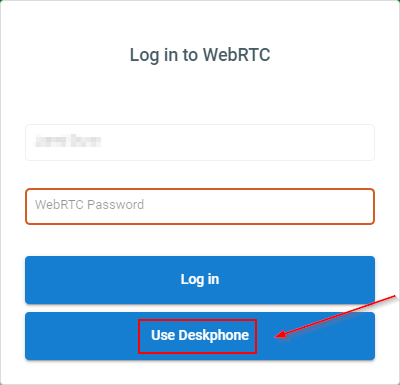
On the second screen, when it asks for your WebRTC password, leave it blank and select Use Deskphone.
Explanation
Click to Dial will now work, but in this order:
- Multimedia calls you first.
- You answer the call through WebRTC.
- Then Multimedia calls the number you selected to dial.
Updated 3 months ago