
How Do I Decommission the 3.12 Services After Updating to BlueDB?
When you update from 3.12 to a newer 4.0/4.2/4.4 version of Chronicall/ACR, the 3.12 services will run concurrently in order to migrate databases. Once that's complete, those services can be decommissioned to recoup the memory and CPU usage they were using.
Answer
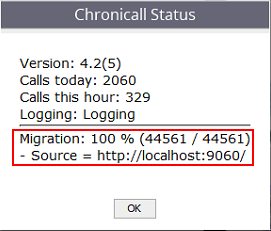
Use the steps below to properly decommission those old services. You can check the status of the migration in the bell icon on the home screen.
-
Log into Chronicall/ACR with Admin privileges.
-
Click the bell icon in the top right.
-
Verify that the database migration is at 100%.
-
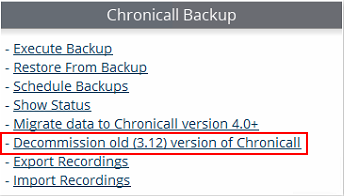
Navigate to Admin (System) > Manage Backups.
-
Select Decommission old (3.12) version of Chronicall.
-
A series of windows will pop up asking if you'd like to continue, and whether you'd like to create a database backup of the old 3.12 install.
-
It's always recommended to create a backup, as a precaution.

-
-
Once this is complete, the 3.12 services will no longer be taking up resources.
-
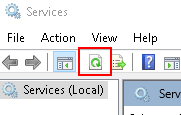
You can verify this by opening the Services program in Windows to see if they're missing. Make sure to refresh at the top to see a current list of services.
-
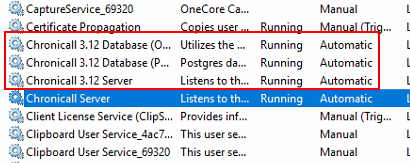
The services listed below should now be gone.
-
Updated 3 months ago