
Realtime is Currently Waiting for a PBX Connection
Overview
For when Realtime isn't connecting. You'll see the error below when you click on Agent Timeline, Group Timeline, or Realtime Stats.
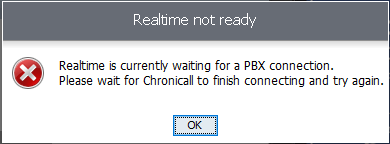
Possible Causes
- Realtime Node service installed on the Chronicall server
- Blocked Realtime port
- Chronicall IP address (check the Chronicall IP address on the Realtime Node, for example in Documentbase)
- Different subnet (determine if Chronicall and the Realtime Node are on the same or different subnets)
- Unregistered serial key
- Datagrid not connecting (3.12 and earlier)
Resolutions
Realtime Node Installed in Error on the Chronicall Server
NoteIf the Realtime Node was installed on the Chronicall server purposefully for Realtime to function, please ignore this section.
- Open the Services application and look for a service called Chronicall Realtime Node.
- If the service is present, stop it.
- Uninstall the Chronicall Realtime Node service.
Blocked Realtime Port
-
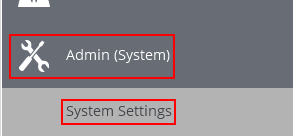
Inside Chronicall, select Admin (System) > System Settings.
-
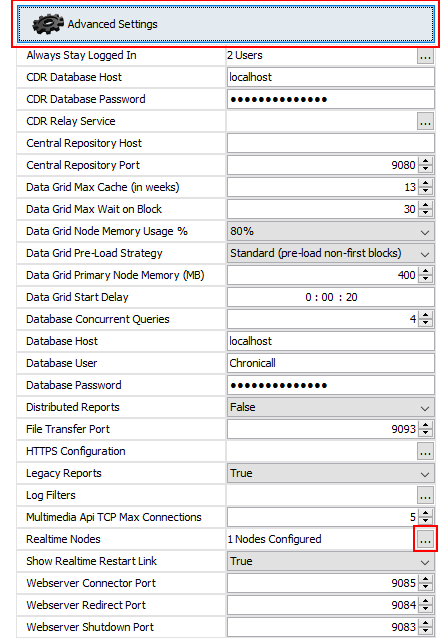
Select Advanced Settings, then click the ellipses next to Realtime Nodes in the lower right.
-
Here you'll see what local port Chronicall Realtime is using. If it's set to
9092, try changing it to10092, then restart the Chronicall service.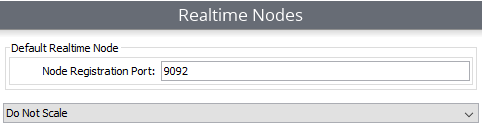
-
Log back into Chronicall and select Agent Timeline, Group Timeline, or Realtime Stats to verify it's now working.
Unregistered Serial Key
Please see this article if you have an unregistered serial key. It's possible some hardware changed, another server registered your serial key, or your company purchased a different serial key to migrate to. You'll need to contact our support team per the linked article if you need your infohash reset, which is usually due to a local hardware change such as a RAM upgrade.
Updated 3 months ago