
Increase Java Memory for Chronicall Desktop
Issue
Chronicall Desktop includes a packaged version of Java. If Chronicall struggles to stay online, you can increase the memory allocation by following these instructions.
Steps
To increase the Java memory limit for Chronicall Desktop:
-
Go to one of the following folders:
C:\Users\<user name>\AppData\Local\Chronicall Desktop\app\C:\Program Files\Avaya Call Reporting\bin\app- 4.2 and up:
C:\Program Files\Chronicall\bin\app
-
Find the ChronicallDesktop.cfg file.
- If prompted how to open it, you can use Notepad.
-
For versions 3.12 or older, add this line at the bottom:
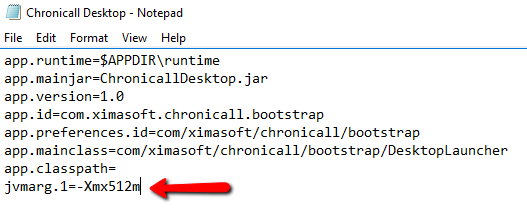
jvmarg.1=-Xmx512m -
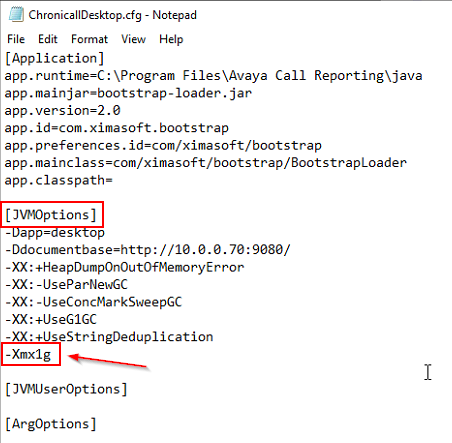
For versions 4.0 or newer, adjust the JVMOptions section for a higher RAM allocation.
- Specifically, adjust the
-Xmx_gline.-
In the example below, Chronicall Desktop is being assigned 1 GB of RAM.
-
- Specifically, adjust the
-
Save the changes.
-
Relaunch Chronicall Desktop or Chronicall Browserless.
Updated 3 months ago