
How to Process Stuck Recordings from Purgatory
Issue Description
Calls are getting stuck while processing, and not populating to Cradle to Grave.
Cause
Typically this is a result of calls getting stuck in the Purgatory folder. Some common causes of this can be:
- Insufficient memory allocated directly to Chronicall.
- A high volume of concurrent calls creating more work than the server can handle.
Resolution
Adjusting the Recording Library settings and then reprocessing the files in Purgatory can allow those stuck calls to finalize into Cradle to Grave.
Adjust Recording Library Steps
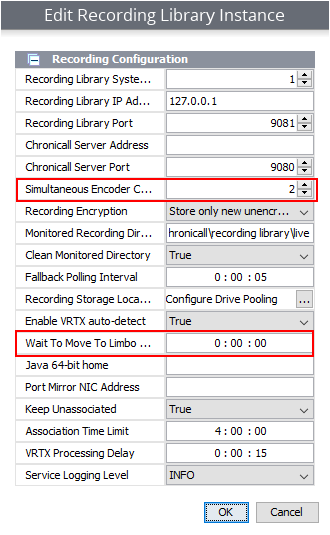
- Open Chronicall and navigate to the Recording Library menu to adjust two settings there.
- Simultaneous Encoder Count — set it, at most, to one less than the total number of cores on the server.
- For example, if you have a 4-core CPU on the server, set it to 3.
- This setting is the number of CPU cores to allow for recording processing. Do not increase it if you don't have extra cores to use.
- Wait To Move To Limbo — by default, this should be 2 minutes (120 seconds).
-
This prevents recordings from being moved into Limbo before they're fully created.
-
- After those are switched, restart the Recording Library service for these changes to take effect.
Reprocess Recordings Steps
- Navigate to the Limbo folder on the Recording Library server. This is typically located in the following file paths:
C:\Program Files (x86)\Xima Software\Chronicall\recording library\limboC:\Program Files\Chronicall\recording library\limboC:\Program Files\Avaya Call Reporting\recording library\limbo/var/lib/Chronicall/recording library/limbo
- Right-click and copy the Limbo folder.
- Navigate to where you want to paste the Limbo folder, paste it, and rename it "Old Recordings."
- Navigate to the Purgatory folder. This is typically located in the following file paths:
C:\Program Files (x86)\Xima Software\Chronicall\recording library\limbo\purgatoryC:\Program Files\Chronicall\recording library\limbo\purgatoryC:\Program Files\Avaya Call Reporting\recording library\limbo\purgatory/var/lib/Chronicall/recording library/limbo/purgatory
- Look for any recordings in the Purgatory folder that aren't processing. These will show as
.wavfiles. - Stop the Recording Library service.
- Copy all the
.wavfiles from the Purgatory folder into the Limbo folder. - Start the Recording Library service.
- Recordings should begin to process again.
- Once they've been processed, you can delete the recordings in the Purgatory folder that were copied over, as they may be duplicated or invalid recordings.
Updated 3 months ago