
Queued Callback (QCB) Issues - Cannot Be Scheduled
Overview
This article covers the reasons a multimedia Queued Callback might not be allowed to be scheduled.
Cause
- Specific skill is set to No Queued Callback.
- The caller is already first in the queue with the "Wait in Queue" strategy.
- Outside of the QCB offer window.
- The call is already a returned callback.
Resolution
Follow the steps below to resolve or identify why callers aren't being offered the queued callback feature.
Confirm QCB Announcement Settings
- Confirm the announcement offering a queue callback is correctly configured in the applicable skills.
- Navigate to Multimedia Configuration > Skill Management.
- Click the ellipsis above the skill you wish to check.
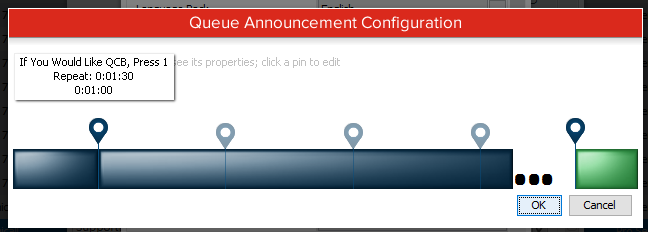
- Click the ellipsis next to "Queue Announcements."
- Verify the default or custom announcement exists in the skill's announcement list.
-
For example, below has the default "If you would like QCB" announcement.
-
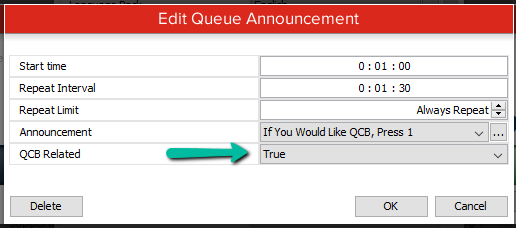
- Open the announcement and verify it's set to "QCB Related: True."
-
This setting prevents QCBs from being offered when a QCB port is not available.
-
If it's set to "False," it can affect proper testing for the rest of the items in this list, as the announcement may be playing when it shouldn't.
-
Queued Callback Strategy
Verify Queued Callback is enabled for the Multimedia Skill in question.
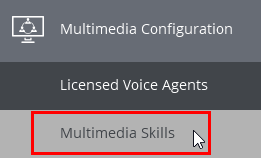
Inside Chronicall, navigate to Multimedia Configuration > Multimedia Skills.
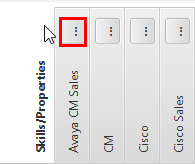
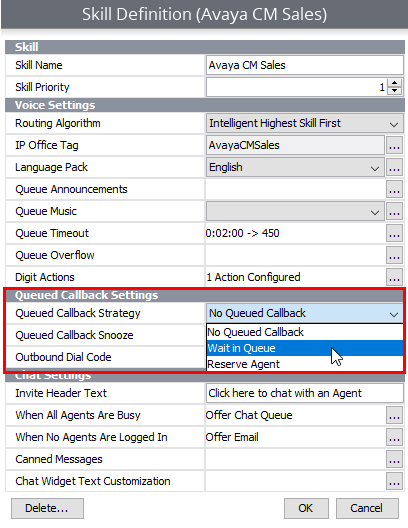
Find the skill having QCB issues, and click the ellipsis, as shown here. In this example, we're looking at the Avaya CM Sales skill.
Here you can verify the related settings for Chronicall's Queued Callback. Select the drop-down arrow next to Queued Callback Strategy. The definition of each option is below.
-
No Queued Callback: Calls in this skill will not use Queued Callback.
-
Wait in Queue: Calls that accept a Queued Callback will wait until they're first in line. Once the caller is first in line, the phone system will attempt to call them and offer them a call. If accepted, the caller will be connected to the queue until their call is answered. This is recommended in environments where call durations are short and agent time is precious.
-
Reserve Agent: Calls that accept a Queued Callback will wait until it's their turn. Once it's the caller's turn, an agent will be removed from the queue and the phone system will attempt to call the person to offer them a call. If accepted, the person will be connected to the reserved agent. This is recommended if average call durations vary in length.
The Caller Is First in Queue with "Wait in Queue" Strategy
The "Wait in Queue" QCB strategy (as outlined above) is designed to call the customer back when they reach position #1 in the queue. If the caller wanting to schedule a callback is already in position #1, they will not hear the callback offer or be able to schedule the callback by pressing the applicable digit action. This was implemented because callers were scheduling callbacks and immediately receiving them while already in position #1.
The Current Time Is Outside of the Skill's QCB Offer Window
Each skill offers a setting to define the window of time a callback can be offered (i.e., when the announcement can be heard). This setting is found in individual skill configuration menus, as it's customizable per skill.
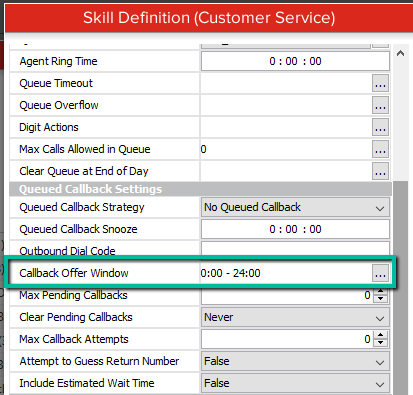
By default, the time is 24 hours. If the setting is modified, any caller outside of that window of time will not hear the queue callback message or be able to schedule a callback, by design.
The Call Is Already a Returned Callback
If a caller has been returned to the queue from a delivered and accepted callback, they will not be able to schedule a callback again. This should be rare, since they're at the front of their respective queue — but if they're still waiting a while for the next available agent, they may want to schedule again but find it's not available.
The Call Is Already Ringing an Agent
Because we don't want a caller to be able to leave the queue when an agent is moments away from answering it (their phone is ringing), we suppress the callback offer announcement.
Updated 3 months ago