
TAPI Issue When Running Chronicall On Mitel MiVoice Connect
Issue
Several Xima Software customers running Chronicall on the Mitel MiVoice Connect platform have experienced a serious issue where the Mitel TAPI stops sending data to Chronicall. Chronicall no longer receives data but is still properly connected to the TAPI. Chronicall has no way of identifying that an error occurred and can't alert the user that there is an issue.
Mitel is aware of the issue and, with the help of their partner-facing article "How to Determine Whether the Microsoft TAPI Defect has Occurred", they have created a patch to help mitigate the problem.
Steps to Move Forward
- The patch was only offered on R19.1-SP2 (22.11.9300.0) and R19.2 (22.13.4800.0), with the code changes permanently added into R19.2-SP1 (22.18.4600.0).
- There is also a fix on the Chronicall side you can try — see the Chronicall Workaround section below.
- If you need this build, reach out to Mitel or your partner to get updated.
Remaining Issues
- Because the patch works by restarting the TAPI service, Chronicall and other applications that rely on a steady TAPI connection will still be affected.
- As it stands, the TAPI service can still fail, but it will be restarted within 5 minutes automatically as of builds 3.12.5cf and up.
- When this happens, Chronicall and other applications are unable to automatically reconnect and receive data, which results in further data loss.
Chronicall Workaround
To enable this fix, navigate to the SH Tapi Recovery Monitor hidden Advanced Settings in Chronicall.
NoteReach out to our support team to get access to the hidden Advanced Settings and have them make this change — there are some very sensitive settings on this page.
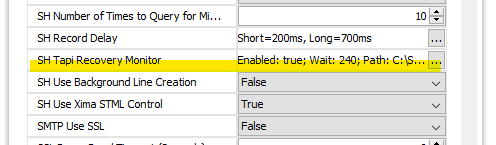
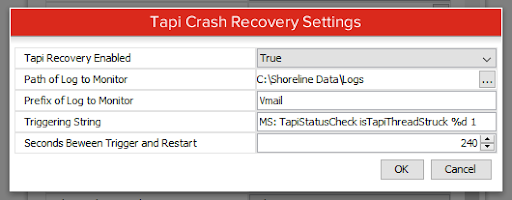
Update the following settings after clicking on the (...):
-
Tapi Recovery Enabled = True
-
Path of Log to Monitor = default value, or C:\Shoreline Data\Logs
-
Prefix of Log to Monitor = Vmail
-
Triggering String = default value, or MS: TapiStatusCheck isTapiThreadStruck %1d 1
-
Seconds Between Trigger and Restart = 240
Currently, we recommend that affected customers reach out to Mitel to receive the patch for the builds mentioned above. Another step to consider is a nightly restart of Chronicall services via Task Manager to help mitigate data loss in the event of a TAPI restart.
Updated 3 months ago