
Chronicall Stopped Logging From UCCX
Issue Description
Chronicall could stop logging from Cisco's UCCX if the UCCX is in a high-availability setup and it fails over to the slave server.
Cause
-
In a high-availability setup, the IP address and port of the UCCX master server is hard-coded in Chronicall's site configuration.
-
If the master UCCX server fails over to a slave, the change would not automatically reflect in Chronicall's settings. If a connection is made to the non-master server, the server will reply with a
FAILURE_CONFindicating errorE_CTI_SERVER_NOT_MASTER.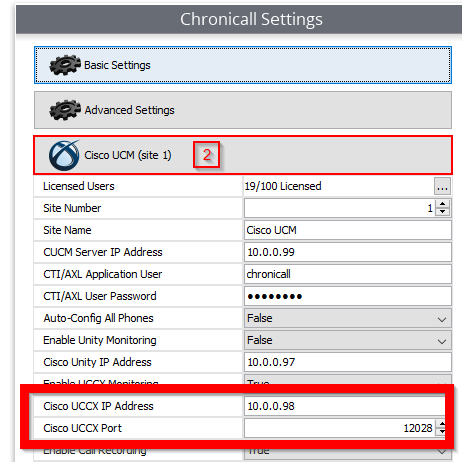
Issue Identification
-
If failover is causing the issue, then the tomcat logs will contain the below errors. Look for the keyword
FAILURE_CONF.(UccxConnection.java:83) com.ximasoft.monitor.cisco.uccx.connection.request.exceptions.UccxRequestTimedOutException: Request Timed Out 2018-10-15 15:57:53.499 [Cisco_UCCX_Conn] Processing Message [type]FAILURE_CONF [class]class com.ximasoft.monitor.cisco.uccx.message.concrete.error.FailureConf (UccxConnection.java:188
Resolution
- Have the customer fail back the UCCX services to the master server.
- Alternatively, check with the customer and change the Chronicall settings to point to the slave server's IP address.
Updated 3 months ago