
Missing Recordings - Cisco
Issue Description
This article covers troubleshooting steps you can take when the audio recordings in the Live or Limbo directory have a duration of zero and a size of 0 bytes.
Potential Causes
- Firewall blocking access.
- Wrong Recording Library IP address inside Chronicall.
- Network routing issue.
- Cisco codec issues.
Resolution
Firewall
Recording Library requires the ability to open random ports (2 per simultaneous recording) to receive the audio data being sent from the agent's phone. Chronicall's Recording Library service must have unrestricted network/port access to accomplish this task without issue. Test this by disabling the firewall and placing a test call, to see if it captures the audio recording.
Recording Library IP Address
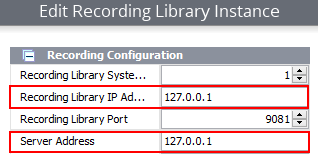
The Recording Library settings must NOT have localhost or 127.0.0.1 defined as the IP address. The actual IP address of the Recording Library server must be used so that the Cisco UCM can send audio packets to the correct IP address. Navigate to the following in Chronicall to verify this.
Navigate to Admin (System) > System Settings > Recording Libraries > (...).
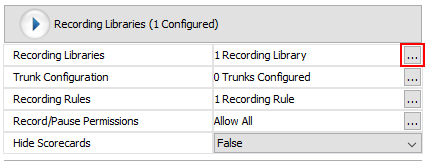
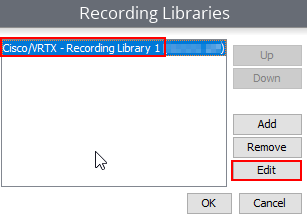
Select the Recording Library with issues, then Edit.
Verify the IP address displayed here does not show 127.0.0.1 (localhost IP) as shown below, even if they are on the local machine. We recommend you use the actual IP address here for both the Chronicall Recording Library server and the Chronicall server.
Network Routing Issue
In the SIP messages, you can see where the audio is coming from (i.e., the IP address of the agent's phone). Make sure their network is able to route packets from that IP address to the Chronicall server. Follow the steps below to enable the filter to see SIP messages in the Recording Library logs.
Inside Chronicall, navigate to Admin (System) > System Settings > Advanced Settings > Log Filters (...).
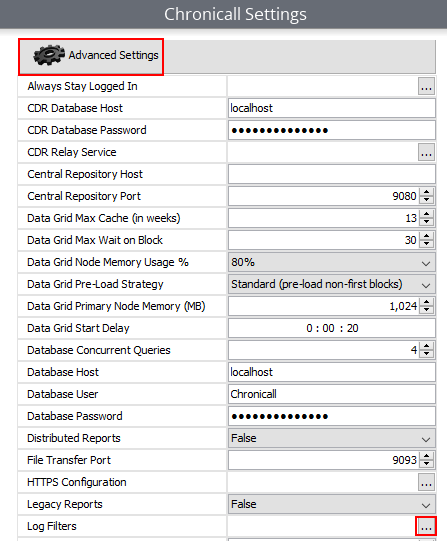
Navigate to Select All Filters > Recording Library > Cisco Unified Communications Manager and verify the below option is checked.
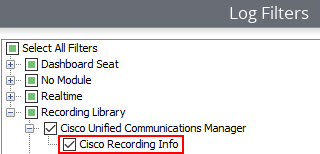
Now make some test calls that should be recorded, then refer to the Recording Library logs at the file paths below to see if you see any relevant errors.
- 32-bit Chronicall
C:\Program Files (x86)\Xima Software\Chronicall\recording libraryC:\Program Files (x86)\Xima Software\Chronicall\recording library\logs/var/lib/Xima Software\Chronicall\recording library
- 64-bit Chronicall
C:\Program Files\Chronicall\recording library\logsC:\Program Files (x86)\Xima Software\Chronicall\recording library\logs/var/lib/Xima Software/Chronicall/recording library/logs
NoteEnsure you disable the Cisco Recording Info log filter when you are done troubleshooting, so it doesn't generate unnecessarily large logs.
Codec Issues
If you turn on the "Recording Debug" log filter, you should be able to see the SIP messaging that sets up call recording. For each recorded call:
-
Chronicall receives two SIP INVITE messages (one for each audio side of the call). Here's an example:
2018-05-11 15:12:35.084 [Cisco_Recording] Request Content: INVITE sip:[email protected]:5070 SIP/2.0 Via: SIP/2.0/TCP 10.16.18.101:5070;branch=z9hG4bK5b7de4519b756;rport=59200 From: "CS - Rosalie Berardo" <sip:[email protected];x-farend;x-refci=42668684;x-nearendclusterid=CM1-Cluster;x-nearenddevice=SEP00070E15F4B6;x-nearendaddr=8853;x-farendrefci=42668497;x-farendclusterid=CM1-Cluster;x-farenddevice=S0/SU0/DS1-0%40qbvoice01.prapa.net;x-farendaddr=516095183867>;tag=3624334~4e2eef74-b92d-4d09-bcc2-96e46c933c9a-42668913 To: <sip:[email protected]> Date: Fri, 11 May 2018 19:13:10 GMT Call-ID: [email protected] Supported: timer,resource-priority,replaces,X-cisco-srtp-fallback,Geolocation Min-SE: 1800 User-Agent: Cisco-CUCM10.5 Allow: INVITE,OPTIONS,INFO,BYE,CANCEL,ACK,PRACK,UPDATE,REFER,SUBSCRIBE,NOTIFY CSeq: 101 INVITE Expires: 180 Allow-Events: presence,kpml Call-Info: <sip:10.16.18.101:5070>;method="NOTIFY;Event=telephone-event;Duration=500" Cisco-Guid: 1453976704-0000065536-0000018461-1695682570 Session-Expires: 1800 P-Asserted-Identity: "CS - Rosalie Berardo" <sip:[email protected]> Remote-Party-ID: "CS - Rosalie Berardo" <sip:[email protected]>;party=calling;screen=yes;privacy=off Contact: <sip:[email protected]:5070;transport=tcp>;isFocus Max-Forwards: 70 Content-Length: 0 -
Chronicall responds to each with an INVITE Response defining the IP address and port on the Recording Library server of where to send the audio (IP address 10.16.18.99 and port 34196 in this example). Here's an example:
2018-05-11 15:12:35.103 [Cisco_Recording] Response Content: SIP/2.0 200 OK CSeq: 101 INVITE Call-ID: [email protected] From: "CS - Rosalie Berardo" <sip:[email protected];x-farend;x-refci=42668684;x-nearendclusterid=CM1-Cluster;x-nearenddevice=SEP00070E15F4B6;x-nearendaddr=8853;x-farendrefci=42668497;x-farendclusterid=CM1-Cluster;x-farenddevice=S0/SU0/DS1-0%40qbvoice01.prapa.net;x-farendaddr=516095183867>;tag=3624334~4e2eef74-b92d-4d09-bcc2-96e46c933c9a-42668913 To: <sip:[email protected]> Via: SIP/2.0/TCP 10.16.18.101:5070;branch=z9hG4bK5b7de4519b756;rport=59200 Content-Type: application/sdp Contact: <sip:[email protected]:5070;transport=tcp> Content-Length: 252 v=0 o=4855 13760799956958020 13760799956958020 IN IP4 10.16.18.99 s=mysession session c=IN IP4 10.16.18.99 t=0 0 m=audio 34196 RTP/AVP 0 8 9 18 a=rtpmap:0 PCMU/8000 a=rtpmap:8 PCMA/8000 a=rtpmap:9 G722/8000 a=rtpmap:18 G729/8000 a=ptime:20 -
It's possible that Chronicall may not receive the SIP INVITE message; if this happens, we either aren't being sent the INVITE or it's not making it to Chronicall.
- This could be caused by configuration, network, resource, or other issues.
- In this case, you can run a Wireshark capture from the Chronicall server and look at the SIP events, and see a SIP INVITE for calls that we record and none for those we don't record.
- If this occurs, the communication issue between Cisco and Chronicall will need to be resolved before we can record calls.
-
If you do see the INVITE message, there may be some additional acknowledgment messages that are sent, but you should not receive a SIP BYE message until the end of the call. If you receive one quickly, and it has
Reason: Q.850;cause=47(like in this example) it means "Transcoding Resources Are Unavailable." Here's an example:2018-05-11 15:12:36.822 [Cisco_Recording] Request Content: BYE sip:[email protected]:5070;transport=tcp SIP/2.0 Via: SIP/2.0/TCP 10.16.18.101:5070;branch=z9hG4bK5b7e2378be2d;rport=59200 From: "CS - Rosalie Berardo" <sip:[email protected];x-farend;x-refci=42668684;x-nearendclusterid=CM1-Cluster;x-nearenddevice=SEP00070E15F4B6;x-nearendaddr=8853;x-farendrefci=42668497;x-farendclusterid=CM1-Cluster;x-farenddevice=S0/SU0/DS1-0%40qbvoice01.prapa.net;x-farendaddr=516095183867>;tag=3624334~4e2eef74-b92d-4d09-bcc2-96e46c933c9a-42668913 To: <sip:[email protected]>;tag=b7943202 Date: Fri, 11 May 2018 19:13:10 GMT Call-ID: [email protected] User-Agent: Cisco-CUCM10.5 Max-Forwards: 70 Reason: Q.850;cause=47 CSeq: 102 BYE Content-Length: 0
It is now time for the customer to configure their system appropriately for region codecs and add transcoding resources if necessary.
Updated 3 months ago