
Campaign Summary - {Campaign}
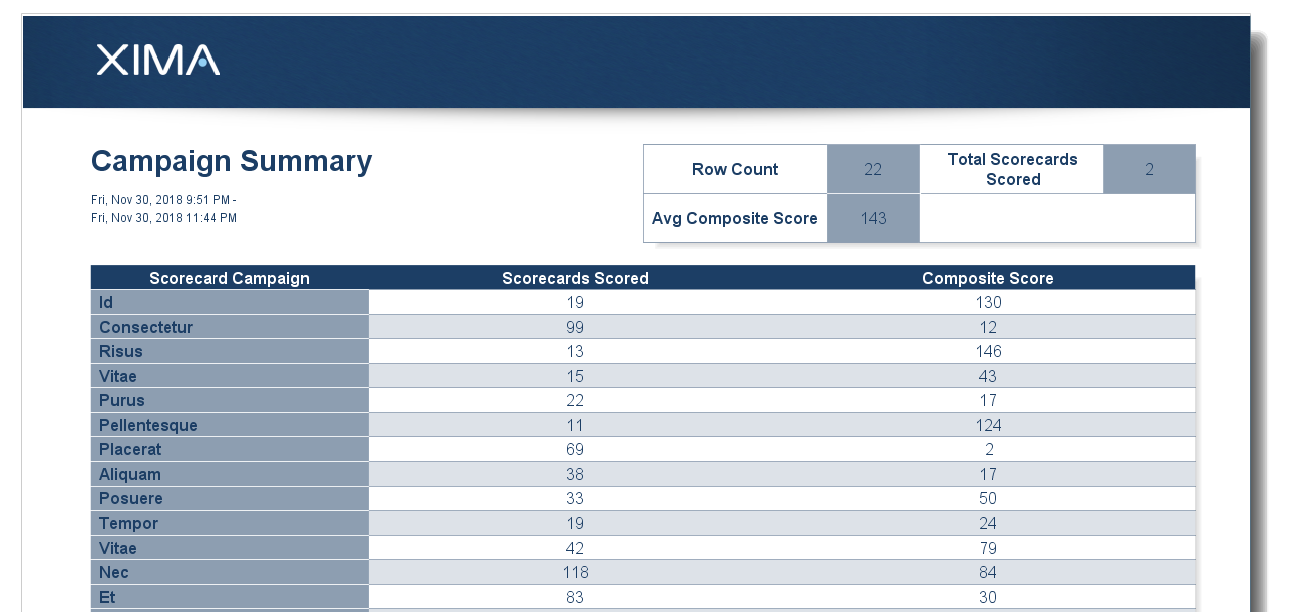
The Campaign Summary report reports on the selected Scorecard Campaigns and displays the number of completed recordings scored and composite score of the recordings scored.
The Campaign Summary is a Summary report. This means that each Scorecard Campaign selected will be displayed on its own individual line next to its specific statistics for the given report.
This is a Campaign report, meaning that it requires the Chronicall Recording Library module.
Additionally, in order for the report to provide any information, a Scorecard Campaign must be created and must provide recordings as part of the Campaign in order for the report to provide any information. To learn how to create a Scorecard Campaign, click here.
Scorecards provide the ability to create a series of questions wherein the manager may evaluate the agent(s)/group(s) performance based on the recordings that coincide with the scorecard. Once a call has been scored, you may then run a report that will provide the scored call statistics.
Updated 11 months ago